
Explore the Best Lightroom Alternatives (User Tested) in 2026
Are you tired of buying the subscription for Lightroom each month or being a novice who doesn’t understand using Lightroom? Maybe you want to make your editing work more professional using powerful features. Being a beginner, learning the robust set of features together would be a difficult task for you. But this can be handled by choosing the best Lightroom Alternatives together to cater your needs.
Adobe’s own Lightroom pricing has also moved since many of these comparisons were first written. Lightroom’s Photography Plan now starts at 19.99 dollars a month for 1TB of storage with Photoshop included, since the older 9.99 dollar 20GB plan is no longer offered to new subscribers. That is worth keeping in mind as a baseline while you read through the alternatives below.
You will explore the great all in one, open source, free, popular, and top alternatives of Lightroom in this post. Of course, everyone wants to know all about the alternatives like their features, uses, pros, and cons. To fulfill all your needs, you have to read the entire article to find a perfect choice for you.
Quick Answer: Best Lightroom Alternatives by Category
If you just want the short version, here is the pick for each common need before we get into the full breakdown:

Best Lightroom Alternatives at a Glance 2026
App | Price | Platform | Best for |
Adobe Photoshop | Subscription | Windows, macOS | Pixel level manipulation and layers |
Skylum Luminar | One-time or Subscription | Windows, macOS | AI powered one click edits |
Capture One | Subscription or perpetual | Windows, Mac, iPad | Tethered shooting and color |
Affinity (by Canva) | Free | Windows, Mac | Free all in one editing |
Snapseed | Free | Android, iOS, iPad | Simple mobile editing |
On1 Photo Raw | Subscription or One-time purchase | Windows, Mac | Lightroom and Photoshop in one app |
DXO Photo lab | Perpetual license | Windows, Mac | RAW noise reduction |
Apple Photos | Free (built in) | iOS, Mac | iCloud photo management |
Darktable | Free and open source | Windows, Mac, Linux | Full control with no cost |
ACDSee Photo Studio | Subscription or perpetual | Windows | All in one asset management |
Polarr | Free, with paid extras | Android, Windows, Web | Quick filter based editing |
RawTherapee | Free and open source | Windows, Mac, Linux | Budget friendly RAW editing |
What are the Best Lightroom Alternatives?
Though Lightroom is a much popular app, still users go for the alternatives to accomplish their needs. You can see Lightroom filled with the extensive list of essential suites of tools to convert RAW images to stunning ones.
However, I was literally surprised when I came to know about the recent survey from Shotkit that revealed:
“Only 58% of photographers use Lightroom while the remaining 42% use an alternative.”
This survey also revealed the apps that photographers and other casual editing app users turn to, listed below:
1. Adobe Photoshop – Powerful Image Manipulation Program
Photoshop is the best Lightroom alternative if you want pixel level control and layer based editing. No doubt, Lightroom still wins on non-destructive editing and image organization, so many photographers keep both.
Photoshop is more popular among Photographers due to advanced tools, multiple layers, merge multiple photos, and a handy watermark. According to Amateur Photographer Verdict:
In the world of digital imaging, Photoshop has been at the forefront for 36 years and is one of the best image editors.
Photoshop has a camera Raw, regular updates, cutting edge AI tools, and graphic design tools. There is a lot to discover if you choose Photoshop as an alternative to Lightroom including neutral filters, powerful selection tools, and incredible image editing.

Why Choose Photoshop as an alternative to Lightroom?
There are several reasons that make Photoshop a quite better choice as an alternative to Lightroom. Here is a list of reasons that help photographers, graphic designers, and artists to use Photoshop as a Lightroom alternative.
Also Read: Here is a comprehensive comparison over Lightroom vs Photoshop, giving you the ultimate reasons to decide which is best!
PROS and CONS of using Photoshop
PROS
CONS
2. Skylum Luminar Neo – Popular as an AI Powered RAW Photo Editor
Skylum Luminar Neo is preferred by users when they wish to make their work impressive with minimal effort. The old Luminar 4 and Luminar AI product names have been retired, and Luminar Neo is now the only version Skylum sells, available either as a one time perpetual license or as a Pro subscription. What makes Luminar Neo a perfect alternative is the presence of powerful AI editing tools.
Using Luminar Neo, you can use layers, raw camera files, and tons of filters and effects. Lightroom cannot provide you sky replacement, portrait editing, and adding a texture overlay as Luminar Neo does, and its generative tools, named GenErase, GenSwap, and GenExpand, let you remove, swap, or extend parts of an image with AI.
The primary reason for choosing Skylum Luminar Neo over Lightroom is highlighted as:
The complex editing projects that require hours of experts to take stunning outcomes can be done in a few seconds using Luminar Neo.
For instance, suppose you are a landscape photographer editing an image of a vast mountain range sunrise. The scene has beautiful colors but the foreground shadows are a bit dark. Now let us have a look at the Lightroom Approach and the Luminar Neo Approach.
Lightroom Approach: By using this approach, you have to use the Graduated Filter first, but it could be tricky to create a precise mask over shadows without affecting other areas.
Then a Brush Tool to refine the mask and selectively adjust the shadows. Of course, it would consume your time and requires a lot of practice for smooth transitions.
Luminar Neo Approach: Here the AI powered features will shine as you can take the outcomes easily using the AI Landscape Tool and the AI Sky Enhancer Tool. They will automatically brighten the foreground shadows, fine tune colors, and add vibrancy without affecting other parts of the image.

Also Read: Ways to smooth skin in Lightroom!
Why Choose Luminar Neo as a Lightroom Alternative?
Let us have a look at the primary reasons to know why Luminar Neo is a better alternative for Lightroom.
Another basic reason for using Luminar Neo is its layers, similar to Photoshop. For beginners, using such tools is quite easy as they don’t have to spend lots of hours learning the software before using it.
PROS and CONS of using Skylum Luminar Neo
PROS
CONS
3. Capture One – PRO Photo Organizing and Editing Software
Capture One is the best Lightroom alternative for tethered shooting and color accuracy. It is popular among photographers because it contains features like tethering and batch exporting that are not available in most other software, and it is designed for precision and control.
Though Capture One is difficult to learn and is for an advanced user, it provides a well defined workflow. For over 650 cameras, it provides custom support to the RAW files, and for around 200 cameras it provides tethering support. Capture One also added native Hasselblad camera support in 2026, with Hasselblad tethering on the way.
Capture One has the following PRO Specs due to which people prefer using it:
The latest version of the app has taken it to another outstanding level due to speed adjustments, Style Layers, and Live Collaboration.
Have a glance over the detailed comparison for Lightroom vs Capture One where you will get all the features for both apps.

Why Choose Capture One Pro as an Alternative to Lightroom?
There are some primary reasons that make Capture One a better choice if you are thinking about the Lightroom alternative.
Capture One is a robust software but a little bit tricky for the beginners. Another drawback to use Capture One is the lack of third party plugins and limited file organization.
PROS and CONS of using Capture One Software
PROS
CONS
4. Affinity (by Canva) – Now a Free All-in-One Editing App
Affinity has gained popularity as an alternative to both Lightroom and Photoshop, and since Canva acquired its maker, Serif, in late 2025, it has become an even easier recommendation. The separate Affinity Photo, Affinity Designer, and Affinity Publisher apps have been combined into one application called Affinity, available for Windows and macOS, with iPad support in progress. Most importantly, the core toolset is now free to use with a free Canva account.
Unlike Lightroom, Affinity uses Pixel, Vector, and Layout studios instead of separate apps or workspaces, and people now switch to it for the price as much as the feature set, since the price is zero for standard editing. Other reasons to choose Affinity may include:
Affinity has the ability to do most of what Photoshop does, with an interface that feels familiar to Photoshop users. Beginners may still find some of the advanced tools take time to learn.

Why Choose Affinity Photo as a Lightroom Alternative?
Affinity Photo is a great choice as an alternative as it is considered an alternative for two best editing apps. Let us check what makes it an amazing choice for photographers, photo editors, creative professionals, and designers.
Affinity is a great piece of software, and the primary reason to consider it now is simple: it costs nothing. All the core functions you need to accomplish what you’d otherwise do in Lightroom or Photoshop are available for free once you sign in with a Canva account.
PROS and CONS of Using Affinity
PROS
CONS
5. Snapseed – Popular Mobile Photo Editing App
The free mobile photo editing app developed by Google is Snapseed, and it is often taken as a Lightroom alternative. People who prefer doing image editing on Android, iOS, and iPad use Snapseed. After several quiet years, Snapseed received a full redesign in 2026 with version 4.0, adding a built-in camera mode alongside its existing editing tools, and it remains completely free with no subscription.
Besides, it is mostly used by casual photographers or those who upload videos to social media platforms. The reasons to choose Snapseed for image editing and sharing on various social media platforms include the following features:
You can easily add text to your photos using Snapseed and you can use gestures to edit your images. Using Snapseed is not so tough as it is recommended for beginners to enhance images with digital filters. Have a look at Lightroom vs Snapseed.
Why should one Choose Snapseed as a Lightroom Alternative?
Similar to other Photo editing apps, Snapseed has some key points that make it a worthy choice as a Lightroom alternative. However, it has some drawbacks too that takes its percentage down.

PROS and CONS of using Snapseed
PROS
CONS
6. On1 Photo Raw – Edit Faster & Smarter
On1 Photo Raw is one of the best Lightroom alternatives chosen by the Photographers as it contains the features of both Lightroom and Photoshop. It has raw development tools that work similar to Lightroom Classic, and the advanced layers help editors to replace Photoshop.
On1 Photo Raw has provided clear updates to make it better compared to others, and among all of them the inclusion of Resize AI is amazing. Besides, there are some other reasons that lead Lightroom users to switch to On1, given below:
Why should one Choose On1 Photo Raw as an alternative to Lightroom?
One of the basic reasons that help you in making a better decision to use the Lightroom alternative is the closest package. On1 Photo Raw offers the closest package to Adobe’s Photographer Plan and it works similar to Classic. Its advanced catalog and layers help users to use Photoshop features in On1 Photo Raw.
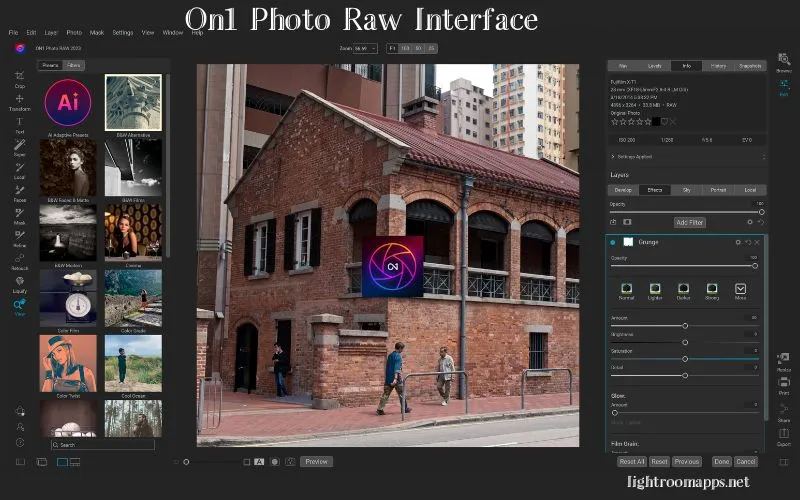
No matter if you are a beginner or advanced photographer, On1 is accessible to both for one click adjustments. Photographers who want precise control over their images find On1 Photo Raw a strong editor. While using On1, its sliders are more gentle in use compared to Lightroom, so control over them is more precise.
Note: Take a look at the Lightroom hidden features and make your editing workflow more engaging and effective.
PROS and CONS of On1 Photo Raw Photo Editor
PROS
CONS
7. DxO Photolab – Advanced & End to End Editing App
DxO PhotoLab is an advanced, end to end, RAW photo editing app. If you are looking for software that offers highly respected AI noise reduction, DxO PhotoLab is the perfect one to choose. Its current generation, DeepPRIME XD3, now covers both Bayer and X-Trans sensor types, so it works across the vast majority of camera bodies rather than only select models.
While using it, you will feel like its features give you the comfort that Adobe Lightroom does, as it contains a library module for image organization. It has an intuitive interface, and it is quite easy for beginners to understand how the adjustments work.
Whether you use the Customize Module, Photo Library Module, or histogram, each one is clean and all functions work at high speed. There are default correction presets available when you first launch the app. You can choose the one that suits you, but advanced photographers mostly choose ‘No Corrections.’
Why should one Choose DxO Photolab Editing Software?
Just like other software, before using or downloading, it is the right of the user to know why they should prefer it.

PROS and CONS DxO Photolab Editing App
PROS
CONS
Also Read: Learn how to add watermark in Lightroom?
8. Apple Photos – Photo Management App for iOS Users
Apple Photos app is the photo management and editing app mainly developed for the iPhone or iOS users. If you are an iOS user, managing your images in your iPhone will be your major task.
Using this app will allow you to organize your photos and videos with iCloud photos and it will automatically appear on Mac due to iCloud. Besides, you can view your memories, share your photos, and videos using the iCloud Shared Photo Library.
The app has a library to import, manage, and export your photos. Using Apple Photos, you may recover your deleted photos.
9. Darktable – The Real Power RAW Developer
Darktable is the best free and open source Lightroom alternative if you want full control with no cost at all. It carries a virtual lighttable and darkroom for photographers and helps manage your digital negatives. The key features that Darktable offers users are as follows:
The more you explore the software, the more its in-depth key features give you a way to enhance your photography. Photographers get infinite options for editing while using Darktable with an improved workflow.
Why should one choose Darktable?
This question is very common among beginner photographers and here is the ultimate answer to choosing Darktable. Either you are a beginner or a PRO photographer, Darktable gives you the following reasons;
- Better Results
- Sharp Previews
- Free and Open Source
- Enhance Originality without AI
- No Bloating

The advanced features and lean design make Darktable a suitable choice for both amateur and professional photographers.
PROS and CONS of Darktable
PROS
CONS
10. ACDSee Photo Studio Ultimate
Individuals who take unlimited photos of any event happening in their lives and want to keep them organized should try ACDSee! Photo Studio is a creative editing software in the digital asset management industry from years with ultimate features.
The software continues to introduce new advanced tools to make editing easier for users. You may try it with a free trial, or buy a subscription if you know how you’ll use it.
The monthly subscription fee for the app is 8.90 dollars, while annually you will pay 89 dollars to access all features. A one time perpetual license is also available for those who prefer to own the software outright. Here are some of the newer features:
The last decision depends on the user’s needs or client’s requirements.

PROS and CONS of ACDSee Photo Studio Ultimate
PROS
CONS
Note: Have a look at the ways to fix blurry photos in Lightroom!
11. Polarr Photo Editor – Free Photography App
If you are looking for the free multimedia app with advanced editing abilities, Polarr Photo Editor is the best choice. Whether you are an amateur or professional editor, wide range of filters has been increasing the ratio of app downloads.
It means you can maintain the quality of your work using advanced editing or formatting tools. These tools include color, light, HSL, toning, fringing, effects, details, vignette, and LUT.
Beginners can easily use the app’s interface as it is simple and clean. Besides, you can export your edited images at high resolution without losing its quality.

PROS and CONS of Polarr Photo Editor
PROS
CONS
12. RawTherapee (Best on Budget) – Popular for Beginners
RawTherapee is considered as the best Lightroom alternatives as it is popular for beginners and best on budget too. Its popularity also comes from its compatibility across various platforms like Windows, macOS, and Linux.
If you are unfamiliar with open source RAW image processing apps, RawTherapee has it covered. Non-destructive editing with RAW files makes it a reasonable stand in for Lightroom if you are not able to use it.
RawTherapee excels in RAW image processing with granular processing tools. You get complete control over editing and processing RAW images through individual settings, an approach not directly available in Lightroom.
While using RawTherapee, you can easily see your hard drive’s folder structure, since it doesn’t use an integrated database system the way Lightroom does.
Why Choose RawTherapee as a Lightroom Alternative?
In an honest perspective, I will say RawTherapee is less known than Lightroom for editing RAW files. Then the question arises: what makes it a preferable choice for the 1% of users who pick it as a Lightroom alternative?

Of course, there is something hidden in the form of robust features in it.
RawTherapee is an excellent choice for beginners who don’t want to pay money for a subscription to edit their photos.
PROS and CONS of Using RawTherapee
PROS
CONS
Frequently Asked Questions
Final Words
I have covered the peak points that every beginner needs to know while choosing the best photo editing app. If you have used Lightroom and now want to polish your editing skills with any other alternative, make a decision.
A quick recap for 2026: Luminar Neo and the newly free Affinity are the two biggest changes to keep in mind since this list first went up, alongside Adobe’s own rising Lightroom prices. The above apps are wonderful, each with advanced features. Check all the features, and start editing your images right now!


